Joomag's AI Agent: Ask Your Analytics Anything
Ask questions about your publications, readers, and email campaigns in plain language. Get clear answers, uncover meaningful insights, and generate ready-to-share reports in seconds.
Joomag AI Agent
Your AI analytics assistant
Ask me anything about your publications, readers, or campaigns.
Which publications performed best last month?
Summer Issue 2026 reached the most readers, but Annual Report held them longest.
| Publication | Readers | Avg. Time | Done |
|---|---|---|---|
| Summer Issue 2026 | 12,480 | 6m 12s | 68% |
| Product Catalog | 9,315 | 4m 47s | 61% |
| Annual Report | 5,902 | 8m 03s | 74% |
Turn that into a PDF report.
Done — formatted and ready to share.
Top Publications — Last 30 Days.pdf
PDF · 412 KB
Send a message…
Uses AI. Verify results.
Trusted by 5,000+ customers and millions of users


Publication and Campaign Analytics, in Plain Language
Your analytics contain valuable answers. Finding them should not require navigating multiple dashboards, adjusting filters, exporting spreadsheets, or rebuilding the same report every month.
The Joomag AI Agent gives your team a faster way to understand performance. Ask what you want to know, refine the question through conversation, and turn the results into something you can immediately use.

Get Answers Faster
Ask questions in everyday language and receive a direct answer with the relevant numbers and context.

Understand What the Data Means
Go beyond individual metrics. Ask the AI Agent to compare performance, identify patterns, and summarize the most important findings.
Create Reports in Minutes
Turn your analysis into polished PDF, Excel, PowerPoint, or Word reports without manually exporting and formatting the data.

Make Analytics Accessible to Everyone
Marketing, editorial, sales, and leadership teams can explore performance without learning complex reporting tools.
What Joomag's AI Agent Does
A Data Analyst in Your Dashboard
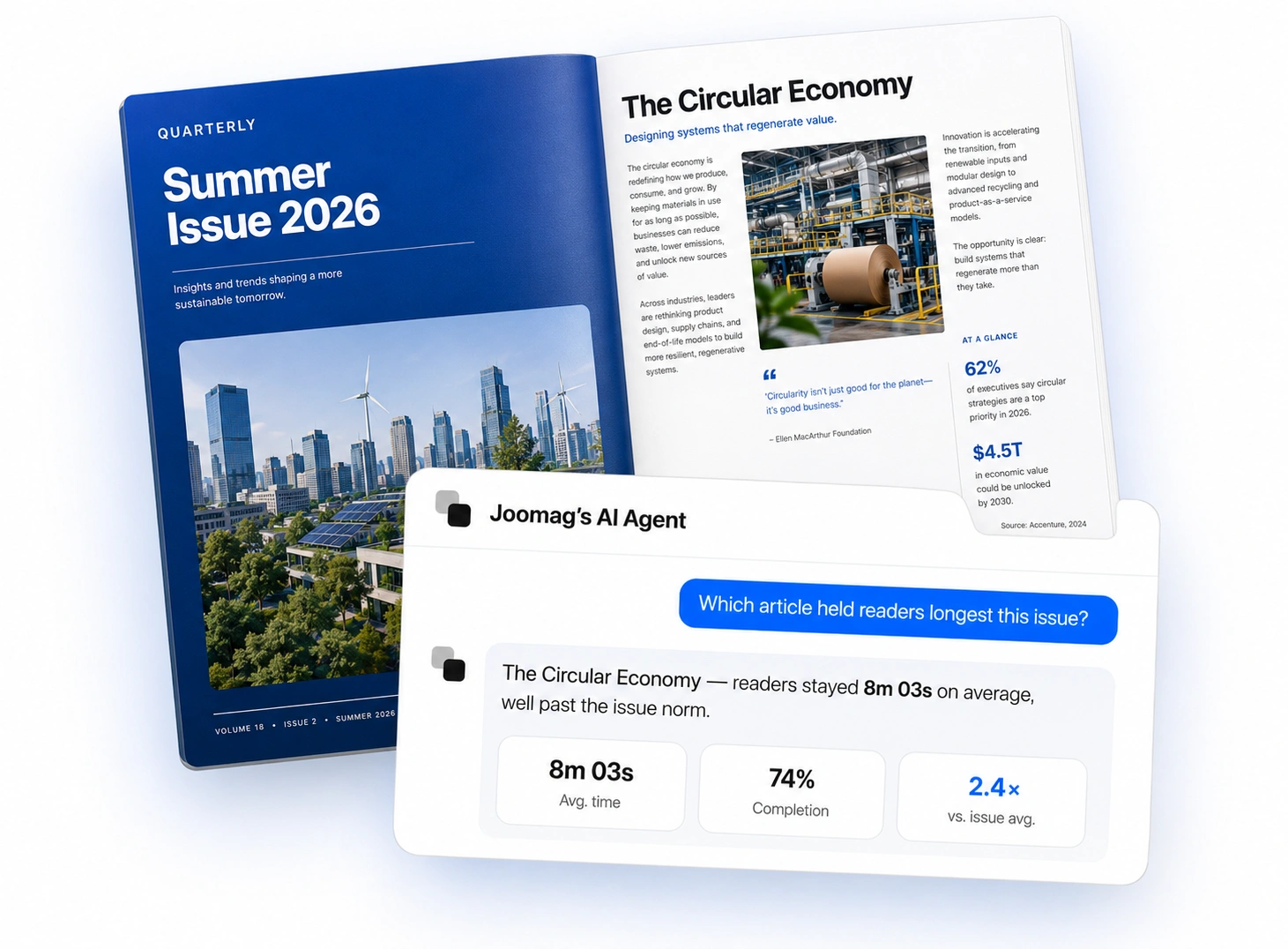
The Agent understands your publications — digital magazines, catalogs, brochures, reports — along with your audience and how your content performs. Ask about reader behavior, acquisition channels, engagement, or advertising, and it queries your live data and hands back a clear answer, not a link to a report you still have to read.
It remembers the conversation, too. Ask a follow-up, narrow the date range, or pivot to a different publication without starting over. When a question could mean two things, it asks which you meant instead of guessing.
Know How Your Email Campaigns Really Performed
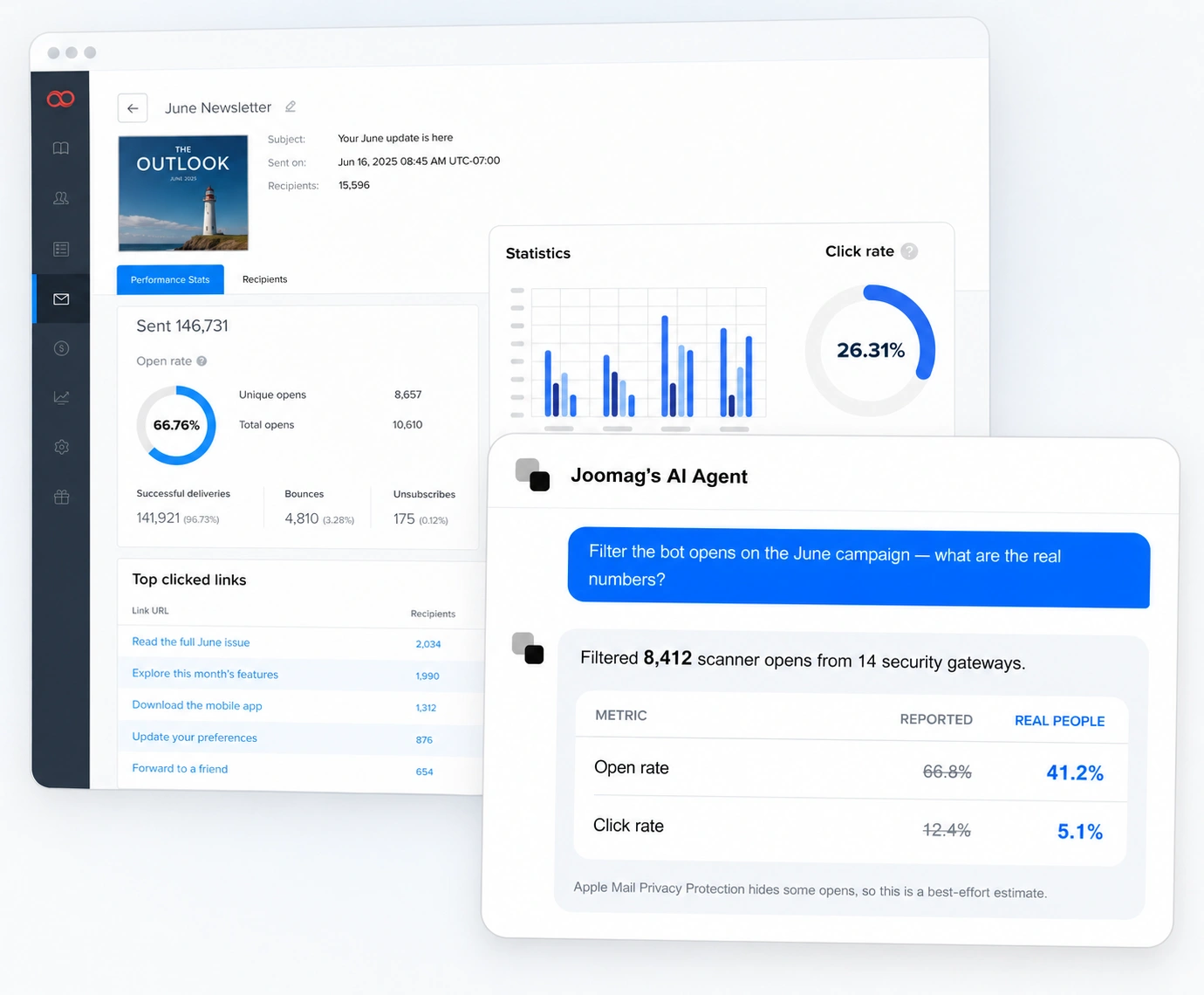
Ask how a campaign did by name — no IDs to look up. Compare sends against each other, see who opened and who clicked, and find out which links actually earned the attention.
Mail security scanners open your emails and click every link the moment a campaign lands, quietly inflating your rates. The Agent recognizes that machine behavior and separates it out, reporting adjusted numbers alongside the raw ones with a note on exactly what it filtered and why.
Every Answer, Ready to Share
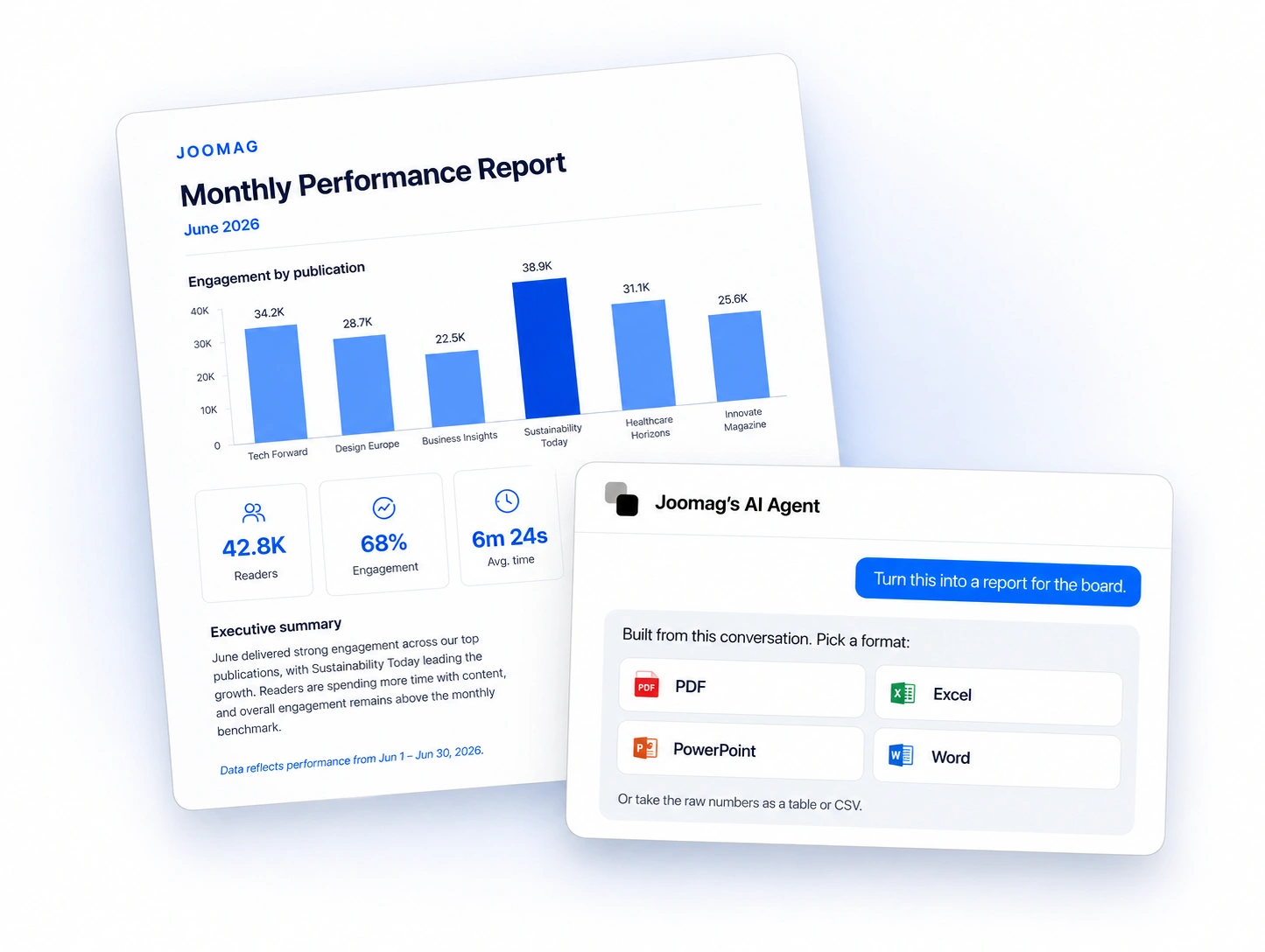
Ask for a report and the Agent builds it — PDF, Excel, PowerPoint, or Word — formatted and ready to send to your team, your board, or your advertisers. The monthly reporting cycle stops being a project.
Prefer the raw numbers? Get any result as a table, a transposed key-value view, or a CSV export. Ask for a plain-language summary and it tells you what the data actually says.
How Joomag's AI Agent Works
From question to shareable report, in four steps.
Open the Agent
The Agent lives inside your Joomag Dashboard, next to the data it reports on. Nothing to install, no second platform to learn, no separate login to remember.
Joomag Dashboard
42.8K
Readers
68%
Engagement
6m 24s
Avg. time
Ask What You Want to Know
Type the question the way you would say it to a colleague. No filters to set, no field names to remember, no query syntax to learn.
- Which of our publications performed best last quarter?
- Compare our last three email campaigns.
- Show the adjusted open and click rates for the August newsletter.
- Create a PowerPoint summarizing these results.
Ask anything
Refine and Explore
The Agent keeps the thread. Narrow the date range, add a comparison, or ask what a number actually means — all without rebuilding the question from scratch.
Share the Results
Keep the answer in the conversation, export the underlying data, or turn the whole analysis into a finished report for your team, your executives, your advertisers, or your clients.
Or take the raw numbers as a table or CSV export.
Give Every Team Faster Access to Insights
Marketing Teams
Evaluate campaign performance, understand acquisition channels, and produce recurring reports with less manual work.
Editorial Teams
Discover which publications, articles, and pages hold readers' attention and use those insights to improve future content.
Sales and Advertising Teams
Turn engagement and advertising data into clear performance updates for advertisers, sponsors, and partners.
Leadership Teams
Get concise summaries of publishing and campaign performance without reviewing multiple dashboards or spreadsheets.
Explore Related Products
The Joomag AI Agent sits on top of the same data your dashboards use. Explore it visually, capture reader sentiment, or push the numbers into the tools your team already runs on.
Analytics
Explore reader retention, engagement, advertising, and individual reader behavior in the full analytics dashboard.
Learn More →Email Marketing
Design, send, and track the campaigns the Agent reports on, purpose-built for publishers.
Learn More →Integrations
Connect Joomag data to your CRM, analytics stack, and marketing tools so the numbers travel with you.
Learn More →Frequently Asked Questions
What is the Joomag AI Agent?
The Joomag AI Agent is an AI analytics assistant built into your Joomag Dashboard. Instead of navigating dashboards and filters, you ask questions about your publications — digital magazines, catalogs, brochures, and reports — along with your audience and your email campaigns, in plain language. It answers in seconds, with tables and finished reports when you need them.
What kinds of questions can I ask it?
Anything your Joomag analytics covers — reader behavior, content performance, acquisition channels, advertising results, and email campaign engagement. Ask for a single number, a comparison across campaigns or issues, a per-reader breakdown, or a summary of what the data means. Follow-up questions work too, since the Agent keeps the context of your conversation.
How does it filter bot opens from my email campaign results?
Mail security scanners automatically open messages and click every link as soon as a campaign is delivered, which inflates open and click rates. The Agent recognizes that machine-like pattern and separates it from genuine reader activity, returning adjusted rates alongside the raw ones and explaining what it filtered. Some privacy features, such as Apple Mail Privacy Protection, leave no detectable signature, so adjusted figures are a best-effort estimate — the Agent tells you when that applies.
What report formats can it generate?
PDF, Excel, PowerPoint, and Word, generated directly from your conversation. You can also get results as tables, transposed key-value views, or CSV exports without leaving the chat.
Can I keep working while the Agent runs?
Yes. Give it a long-running question or a large report and you can navigate away — it keeps working in the background, and the answer is waiting when you come back. You can also run it as a floating widget, dock it to a sidebar, or go fullscreen, and keep separate conversation threads for separate topics. If you want it to reference something from outside Joomag, attach an image, PDF, or text file to the conversation.
Does the Joomag AI Agent cost extra?
The Agent runs on AI credits, and usage depends on the complexity of your questions and the documents it generates. Simple questions use very little; large multi-part reports use more.
How is this different from Joomag's Analytics dashboard?
They're two ways into the same data. The Analytics dashboard is where you explore visually, with charts and filters you navigate yourself. The Agent is where you ask directly and get the answer without building the view first. Most teams use both — the dashboard for regular monitoring, the Agent for the one-off question and the report that follows it.
See What the Agent Finds in Your Analytics
Bring a real question about your publications or your last email campaign. We'll show you the answer — including how much of that open rate came from bots.